How to Keep Track of All the Skincare Products You Own
Keep track of every skincare product you own with Product Lists in Skin Bliss. Build a virtual shelf, track expiry dates, and sort favorites.

Maria Otworowska, PhD, Co-founder of Skin Bliss
· 5 min read

The simplest way to keep track of every skincare product you own is to build a virtual shelf with Product Lists in Skin Bliss. You recreate your real shelf inside the app, so your current routine, your expiration dates, and your favorites all live in one place. Once your shelf exists, you can check whether a new product fits what you already have, and sort everything into custom lists that make sense to you.
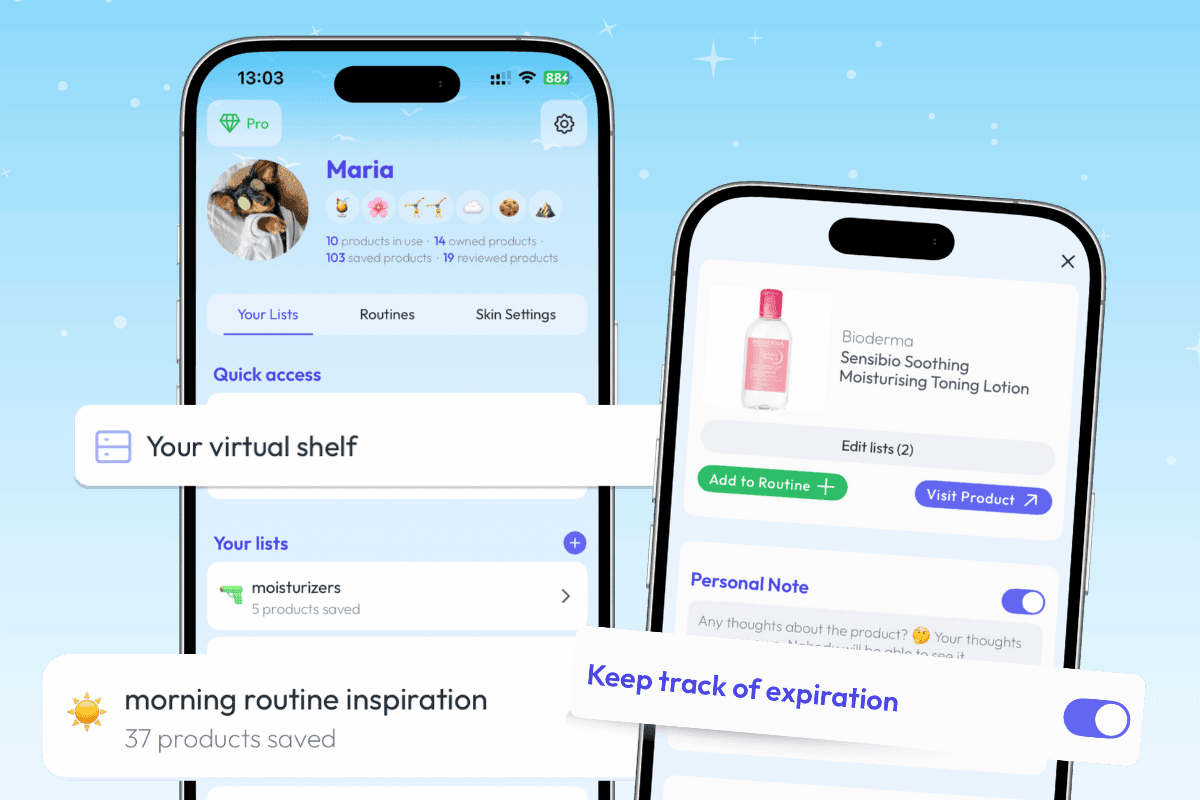
Recreate Your Real Shelf Inside the App
Most people lose track of their products the same way: a serum gets pushed to the back of a drawer, a moisturizer runs low without anyone noticing, and a half-used cleanser sits past its prime. The clutter is physical, but the real problem is that nothing is written down.
Product Lists fixes that by letting you recreate your virtual shelf in the app. You add the products you actually own, and that collection becomes a record of your current routine. Instead of mentally juggling what you have, you can open one screen and see it.
A virtual shelf also helps you track expiration dates. Skincare products do not last forever, and an opened jar has a shorter life than a sealed one. Logging your shelf in Product Lists gives you a place to keep that information, so a product getting old is something you notice on purpose rather than discover by accident.
The point is not to add admin to your routine. It is to replace the guesswork of "what do I even own?" with a clear, up-to-date list.
Check New Products Against What You Already Have
Buying skincare often happens in isolation. You see a product, it sounds promising, and into the basket it goes, with no easy way to ask whether it suits the routine you already run.
Product Lists closes that gap. Because your virtual shelf already holds your current products, you can check a new product's compatibility directly against what is on your shelf. That turns a blind purchase into an informed one.
This matters most with actives. Layering certain ingredients can raise irritation risk, and it can be hard to spot a clash by reading two labels side by side. Checking a potential buy against your existing shelf can help flag whether it pairs well with what you already use, before it joins your routine. If you want a deeper look at how ingredients interact, the Ingredient Compatibility Checker in Skin Bliss covers that side in more detail.
The takeaway is simple: when your shelf is logged, every new product gets evaluated in context instead of on its own.
Sort Everything Into Custom Lists
A single long list of products is better than no list, but it is not how most people think about their skincare. You have things you love, things that did not work, and things you are still curious about.
Product Lists lets you create custom lists to organize by concern, routine, or experimentation. You decide the categories. That could mean a favorites list, a fails list, and a wishlist, or it could mean grouping products by morning and evening routine, or by the skin concern they target.
Custom lists make your shelf usable. A fails list stops you from re-buying something that already disappointed you. A wishlist keeps your "maybe later" products in one spot instead of scattered across screenshots. An experimentation list gives you a clear place for products you are still testing before deciding where they belong.
However you sort it, the goal is the same: a shelf you can actually use, organized the way your routine actually works.
FAQ
How do I keep track of all my skincare products in one place?
Build a virtual shelf with Product Lists in Skin Bliss. You add the products you own, and the app holds them as an organized collection, so your current routine and your products all live in one screen instead of in your memory.
Can Product Lists help me track expiration dates?
Yes. Recreating your virtual shelf in Product Lists gives you a place to log the products you own and track expiration dates, so a product getting old is something you notice rather than miss.
How do I know if a new product fits my current routine?
Because your shelf is already logged, Product Lists lets you check a new product's compatibility directly against what is on your shelf. That helps you evaluate a potential buy in the context of what you already use.
Can I organize my favorites and wishlist separately?
You can. Product Lists lets you create custom lists, so you can keep favorites, fails, and wishlist items as separate groups, or organize by concern, routine, or experimentation instead.
What is the difference between a virtual shelf and a routine?
Your virtual shelf is everything you own. Your routine is what you actually use and when. Product Lists holds the full shelf, and custom lists let you group products by routine if that is how you want to see them.
Get Started
A tidy shelf starts with knowing what is on it. Open Product Lists in Skin Bliss at getskinbliss.com, recreate your virtual shelf, and sort your favorites, fails, and wishlist into lists that match how you actually do skincare.

In your browser
Free Skin Quiz: Understand your skin profile in under 5 minutes
Oily or dry is only the start. Find out what your skin actually needs across six skin dimensions, with a plain note on what each one means for your routine. Results appear in your browser, and you can keep them in the app.

Maria combines her background in AI research with a passion for evidence-based skincare. She built Skin Bliss to help people make informed decisions about their skin, backed by science rather than marketing.